NSAlert でダイアログボックスを作成(macos)
Storyboard + SwiftでmacOSアプリの学習。
NSAlertでダイアログボックスを表示させる。
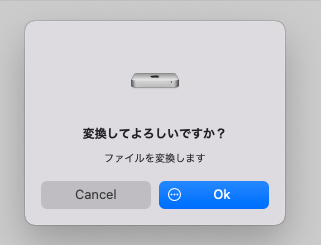
1.スタイル
- アラートをシートとして表示するには、beginSheetModal(for:completionHandler:)
- モーダルのダイアログとして表示するには、runModal()
2.複数ボタンを表示
ちょっと特殊。まず、位置(NSAlertFirstButtonReturn、など)で識別されるようだ。
こちらはググると結構出てくるのだが、ボタンの役割を位置で識別するのはしっくりこない、、、ググってもなかなか情報がなくてわかりにくかったが、tagメソッドを使って実現できた。
addButton(withTitle:) | Apple Developer Documentation
- ボタンはアラートの右側から左側に向かって配置されます(左から右へ読む言語の場合)。最初の 3 つのボタンは、モーダルデリゲートによって評価される return-code パラメータで NSAlertFirstButtonReturn、NSAlertSecondButtonReturn、NSAlertThirdButtonReturn として位置的に識別されています。後続のボタンは、NSAlertThirdButtonReturn +n として識別されます(n は整数)
- デフォルトでは、最初のボタンのキーはReturn、「キャンセル」というタイトルのボタンはEscape、「保存しない」というタイトルのボタンはCommand-Dに相当します(ただし、最初のボタンでない場合のみ)。また、NSButtonクラスのkeyEquivalentメソッドを使えば、ボタンに異なるキー等価を割り当てることができます。
- NSButtonクラスのtagメソッドを使うと、戻り値を設定することができます。
3.ソース
enum ButtonTag: Int {
	case Ok = 100
	case Cancel = 200
}

@IBAction func convert(_ sender: Any) {
	let alert = NSAlert()

	alert.alertStyle = NSAlert.Style.warning
	alert.messageText = "変換してよろしいですか?"
	alert.informativeText = "ファイルを変換します"
	alert.icon = NSImage(named: NSImage.computerName)

        let ok = alert.addButton(withTitle: "Ok")
	ok.image = NSImage(named: NSImage.actionTemplateName)
	ok.imagePosition = NSControl.ImagePosition.imageLeft
	ok.tag = ButtonTag.Ok.rawValue

	let cancel = alert.addButton(withTitle: "Cancel")
	cancel.tag = ButtonTag.Cancel.rawValue

	// alert.runModal()
	alert.beginSheetModal(for: self.view.window!, completionHandler: { response in
	    switch response.rawValue
	    {
	        case ButtonTag.Ok.rawValue:
		    print("OK")
		    break
		case ButtonTag.Cancel.rawValue:
		    print("Cancel")
		    break
		default:
		    print("invalid")
	    }
	})
}