Android Kotlin 通知サンプル
- Android 8.0 以降で通知をまとめる(以前ではまとめない)
- 通知クリックでアクティビティを起動する
Android 8.0
通知がまとまっている
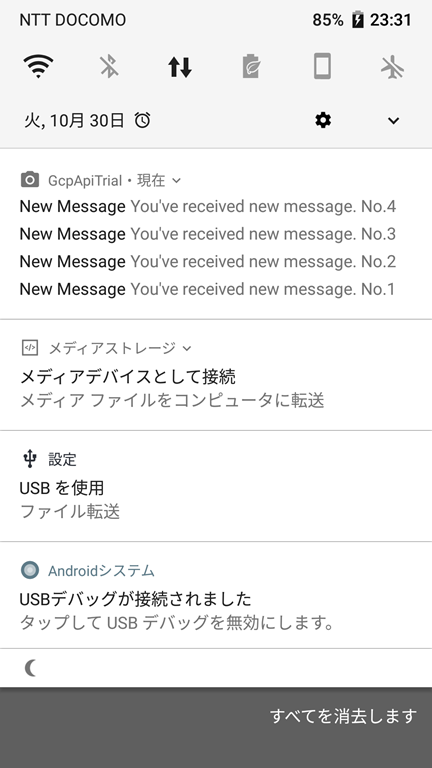
通知を展開
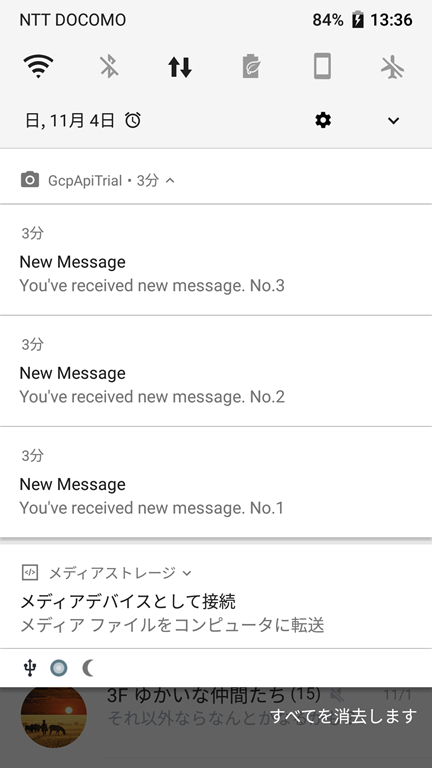
Android5.0
通知はまとまらない

サンプル
private var mNotificationNumber = 0
/**
 * 通知
 * @see http://android.techblog.jp/archives/7976103.html
 * @see https://developer.android.com/guide/topics/ui/notifiers/notifications?hl=ja
 * @see https://developer.android.com/training/notify-user/build-notification
 * @see https://developer.android.com/training/notify-user/channels
 * @see https://developer.android.com/training/notify-user/group?hl=ja#create_a_group_and_add_a_notification_to_it
 * @see https://qiita.com/mstssk/items/14e1b94be6c52af3a0a6
 * @see https://qiita.com/naoi/items/367fc23e55292c50d459
 * @see https://www.gaprot.jp/pickup/old-tips/android-o/notification-channel
 */
private fun notification() {
    val channelId = "channelId"
    val channelName = "GcpApiTrial"
    val groupKey = "groupKey"
    val notifyId = ++mNotificationNumber;

    val manager = getSystemService(Context.NOTIFICATION_SERVICE) as NotificationManager

    if (android.os.Build.VERSION.SDK_INT >= android.os.Build.VERSION_CODES.O) {
        // 通知チャネルの登録
        // targetSdkVersion(26 Oreo) 以降の場合、通知チャネルを使用しないと通知が表示されない
        // 複数のチャンネルを作り、個々の通知を任意のチャンネルに割り振ることによって、
        // 重要度や通知音などの属性を一括で指定することができる
        val summaryId = 0
        if (manager.getNotificationChannel(channelId) == null) {
            val channel = NotificationChannel(channelId, channelName, NotificationManager.IMPORTANCE_DEFAULT)
            channel.apply {
                description = "GcpApiTrial Notification"
            }
            manager.createNotificationChannel(channel)
        }
        val summary = NotificationCompat.Builder(this, channelId).run {
            setContentTitle("Summary Content Title")
            setContentText("New Message.")
            setSmallIcon(R.drawable.ic_menu_camera)
            setStyle(NotificationCompat.InboxStyle().addLine("New Message Add line"))
            setNumber(mNotificationNumber)
            setGroup(groupKey)
            setGroupSummary(true)
            build()
        }
        manager.apply {
            notify(summaryId, summary)
        }
    }

    // 通知クリックでアクティビティを起動
    val intent = Intent(this, MainActivity::class.java)
    val stackBuilder = TaskStackBuilder.create(this)
    stackBuilder.addParentStack(MainActivity::class.java)
    stackBuilder.addNextIntent(intent)
    val pendingIntent = stackBuilder.getPendingIntent(0,PendingIntent.FLAG_UPDATE_CURRENT)

    // 通知の作成
    val notification = NotificationCompat.Builder(this, channelId).run {
        setContentTitle("New Message")
        setContentText("You've received new message. No.$mNotificationNumber")
        setSmallIcon(R.drawable.ic_menu_camera)
        setNumber(mNotificationNumber)
        setContentIntent(pendingIntent)
        setAutoCancel(true) // 通知クリックでクリア
        setGroup(groupKey)
        build()
    }
    manager.apply {
        notify(notifyId, notification)
    }
}
参考
http://android.techblog.jp/archives/7976103.html
https://developer.android.com/guide/topics/ui/notifiers/notifications?hl=ja
https://developer.android.com/training/notify-user/build-notification
https://developer.android.com/training/notify-user/channels
https://developer.android.com/training/notify-user/group?hl=ja#create_a_group_and_add_a_notification_to_it
https://qiita.com/mstssk/items/14e1b94be6c52af3a0a6
https://qiita.com/naoi/items/367fc23e55292c50d459
https://www.gaprot.jp/pickup/old-tips/android-o/notification-channel