React の単純なサンプルに React Router を組み込んだものに Redux-Saga を適用したものからAjax通信を組み込む


React は Viewしか担当していないので、その他の機能を含めたアプリのスケルトン作成を目指す。
Node.js、npm パッケージ管理、および、ブラウザが対応していないECMAScriptバージョンの利用にBabelを利用するなどを含めた環境構築、ページ遷移のためのReact Router、アプリケーションアーキテクチャとしてのRedux、非同期処理のためのRedux-Saga をとりあえず、最低限のレベルで組み合わせた。
- React 開発の全体像を把握しつつ開発環境を整える
- React の単純なサンプルに React Router を適用する
- React の単純なサンプルに React Router を組み込んだものに Redux-Saga を適用する
次は、Ajax通信部分を組み込む。
Ajax の部分だけを利用するのに、jQueryはオーバースペック(かつ容量を無駄に消費)してしまうため、HTTP通信の特化した、SuperAgetnt を使用することとする。
github : https://github.com/pppiroto/react_get_start.git
1.インストール
npm install --save superagent
2.実装
2.1 ダミーAPIの結果
まずは、疎通をしたいだけなので、APIの結果を想定した、json ファイルを作成する。
/hello_successurl.json
{
    "message":"HELLO FROM API"
}
2.2 Action
以下のActionを追加する。
- HELLO_API : 上記で作成したダミーjsonを取得する場合に呼び出す
- HELLO_API_SUCCESS : 取得が成功した場合に呼び出す
- HELLO_API_FAIL : 取得が失敗した場合に呼び出す
/actions/index.js
import { createAction } from 'redux-actions';

export const HELLO = 'HELLO';
export const HELLO_API = 'HELLO_API';
export const HELLO_API_SUCCESS = 'HELLO_API_SUCCESS';
export const HELLO_API_FAIL = 'HELLO_API_FAIL';

export const helloAction = createAction(HELLO);
export const helloApiAction = createAction(HELLO_API);
export const helloApiSuccessAction = createAction(HELLO_API_SUCCESS);
export const helloApiFailAction = createAction(HELLO_API_FAIL);
2.3 Ajax API
- Ajax 通信を行い、データを取得する関数を作成、ここで、SuperAgentを使用する。
- データの非同期取得のために、Promise を使用する(Promiseについては、こちらを参照)
以下は確認用のやっつけコード
- id として、2.1 のダミーファイル名の一部を渡すことで、取得成功、失敗を確認
- クエリパラメータとしてダミーのランダム文字列を付与することで、ブラウザがキャッシュするのを抑制
services/helloApi.js
import request from 'superagent';

// http://qiita.com/salesone/items/356572e689b9c2099c5c
export function helloApi(id) {
    console.log("helloApi(" + id + ")");
    return new Promise(
        (resolve, reject) => {
            request
                .get("./hello_{0}.json?dt=".replace("{0}", id) + Math.random().toString().replace(".", ""))
                .end(function (err, res) {
                    if (err) {
                        reject(err);
                    } else {
                        resolve({ payload: res.body });
                    }
                });
        }
    );
}
2.4 Sagas
上記で作成したAPIを呼び出し、成功/失敗に応じたActionを値をセットし呼び出す。
/sagas/index.js
import { takeEvery } from 'redux-saga';
import { call, put } from 'redux-saga/effects';
import {
    HELLO, helloAction,
    HELLO_API, helloApiAction,
    HELLO_API_SUCCESS, helloApiSuccessAction,
    HELLO_API_FAIL, helloApiFailAction
} from '../actions';
import { helloApi } from '../services/helloApi';

export function* getHelloApi(action) {
    console.log(helloApiSuccessAction());
    try {
        console.log(action);
        const data = yield call(helloApi, action.payload.id);
        yield put(helloApiSuccessAction(data.payload));
    } catch (error) {
        yield put(helloApiFailAction(error));
    }
}

// https://redux-saga.js.org/docs/basics/UsingSagaHelpers.html
export default function* rootSaga() {
    //yield* takeEvery(HELLO, helloAction);
    yield* takeEvery(HELLO_API, getHelloApi);
}
2.5 Reducer
Actionに設定された値から状態値を生成する。
ダミーの単純な処理のため、識別のため、末尾に処理時間を付与している。
/reducers/hello.js
import { HELLO, HELLO_API, HELLO_API_SUCCESS, HELLO_API_FAIL } from '../actions';

export default function hello(state="", action) {
    var suffix = " " + (new Date()).toLocaleTimeString("ja-JP");
    switch (action.type) {
        case HELLO:
            return action.payload + ",hello" + suffix;
        case HELLO_API_SUCCESS:
            return action.payload.message + suffix;
        case HELLO_API_FAIL:
            return action.payload.toString() + suffix;
        default:
            return state;
    }
}
2.6 App
- Home コンポーネントに、成功/失敗のAPI呼び出しボタンを配置。
- name 属性の値をActionに引き渡す
/containers/app.js
import React, { Component } from 'react';
import { BrowserRouter, Route, Link } from 'react-router-dom';
import { connect } from 'react-redux';
import { withRouter } from 'react-router-dom'
import { helloAction, helloApiAction } from '../actions';

class Home extends Component {
  handleMessage() {
    this.props.dispatch(helloAction('Yes'));
  }
  handleMessageApi(event) {
    this.props.dispatch(helloApiAction({id:event.target.name}));
  }
  render () {
    return (
      <div>
        <h2>Home</h2>
        { this.props.hello }
        <br />
        <button onClick={ this.handleMessage.bind(this) } >Hello</button>
        <br />
        <button name="successurl" onClick={ this.handleMessageApi.bind(this) } >API(Sucess)</button>
        <br />
        <button name="failurl" onClick={ this.handleMessageApi.bind(this) } >API(Fail)</button>
      </div>
    );
  }
}

const About = () => (
  <div><h2>About</h2></div>
)
const Topics = () => (
  <div><h2>Topics</h2></div>
)

class App extends Component {
  render() {
    return (
      <BrowserRouter>
        <div>
          <ul>
            <li><Link to="/">Home</Link></li>
            <li><Link to="/about">About</Link></li>
            <li><Link to="/topics">Topics</Link></li>
          </ul>
          <hr />
          {/* http://qiita.com/kuy/items/869aeb7b403ea7a8fd8a */}
          <Route exact path="/" component={connect(state => state)(Home)} />
          <Route exact path="/about" component={About} />
          <Route exact path="/topics" component={Topics} />
        </div>
      </BrowserRouter>
    );
  }
}

// http://qiita.com/MegaBlackLabel/items/df868e734d199071b883#_reference-863a1e1485bf47f046e5
function mapStateToProps(state) {
  return {
    message:state.hello
  };
}

// https://stackoverflow.com/questions/43350683/react-router-uncaught-typeerror-cannot-read-property-route-of-undefined
// export default withRouter(connect(mapStateToProps)(App))
export default connect(state => state)(App)
3.実行
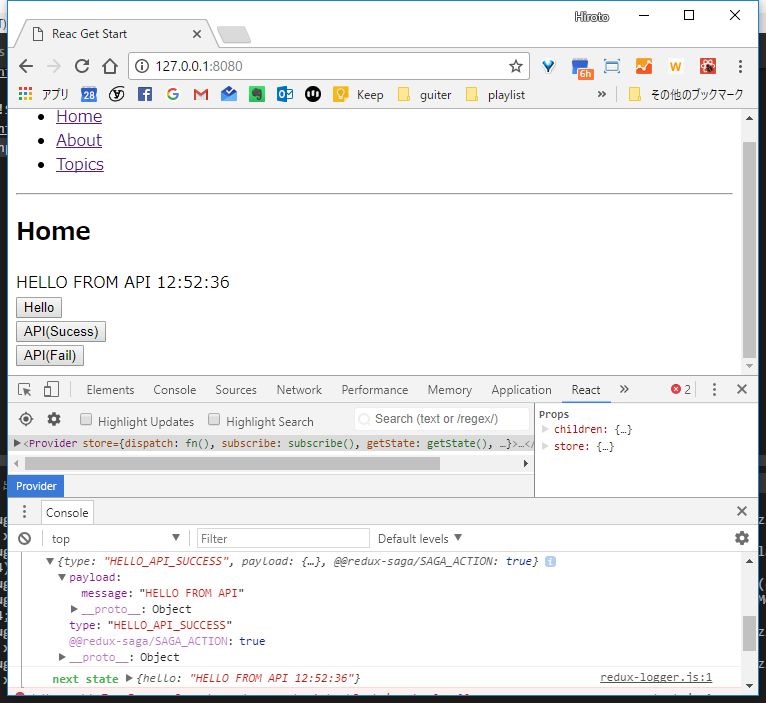
3.1 成功
成功ボタンを押下、json取得し、Actionによりstateが更新され、そうていされた結果が表示されたOK。
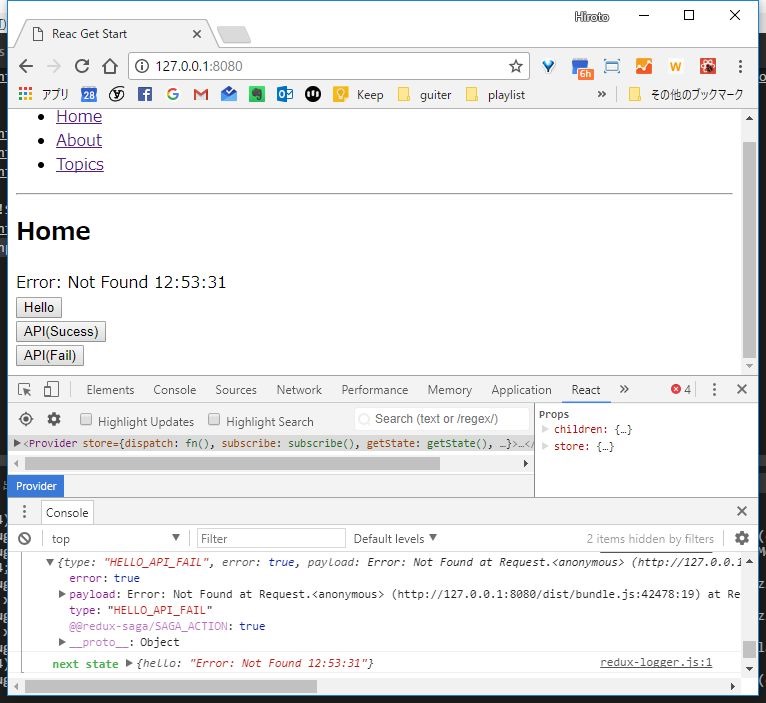
3.2 失敗(存在しないURLを指定)
失敗ボタン押下で、存在しないURLへアクセスしに行き、結果エラーメッセージが画面表示されたOK。
ようやく最低ラインにたどり着いた。。。


- React 開発の全体像を把握しつつ開発環境を整える
- React の単純なサンプルに React Router を適用する
- React の単純なサンプルに React Router を組み込んだものに Redux-Saga を適用する
- React の単純なサンプルに React Router を組み込んだものに Redux-Saga を適用したものからAjax通信を組み込む
- React環境->React Router->Redux-Saga->SuperAgent に Bootstrapを適用する