React環境->React Router->Redux-Saga->SuperAgent に Bootstrapを適用する


Reactアプリのスケルトン作成を目指して、一歩一歩。
- React 開発の全体像を把握しつつ開発環境を整える
- React の単純なサンプルに React Router を適用する
- React の単純なサンプルに React Router を組み込んだものに Redux-Saga を適用する
- React の単純なサンプルに React Router を組み込んだものに Redux-Saga を適用したものからAjax通信を組み込む
Bootstrap を Reactから利用できるようにする、React-Bootstrap を導入する。
1.インストール
Bootstrapは、jQueryに依存しているが、ここでjQueryを導入してしまうと、jQueryのDOM操作とかは不要なので、Ajax通信のみのSuperAgentを導入したのに、なんだかなぁな感じになってしまうところだが、、、
https://react-bootstrap.github.io/getting-started.html
React-Bootstrap is a complete re-implementation of the Bootstrap components using React. It has no dependency on either bootstrap.js or jQuery. If you have React setup and React-Bootstrap installed you have everything you need.
You can consume the library as CommonJS modules, ES6 modules via Babel, AMD, or as a global JS script.
React-Bootstrapでは、Reactを使用して、Bootstrapコンポーネントを完全に再実装しているとのこと。bootstrap.js にも、jQueryにも依存していなくて、React と React-Bootstrapをインストールすれば、十分らしい。安心してインストール!
npm install --save react-bootstrap
2.実装
ということで、上記 Ajax通信を組み込んだ状態に、変更を加えてみる。
https://github.com/pppiroto/react_get_start/releases
/index.html
チュートリアルに従い、HTMLから、CSSを CDNを参照するように指定する。
<!doctype html>
<html>
    <head>
        <meta charset="utf-8">
        <!-- Latest compiled and minified CSS -->
        <link rel="stylesheet" href="https://maxcdn.bootstrapcdn.com/bootstrap/latest/css/bootstrap.min.css">
        <!-- Optional theme -->
        <link rel="stylesheet" href="https://maxcdn.bootstrapcdn.com/bootstrap/latest/css/bootstrap-theme.min.css">
        <title>Reac Get Start</title>
    </head>
    <body>
        <div id="root"></div>
        <script src="./dist/bundle.js"></script>
    </body>
</html>
/container/app.js
react-bootstrap から、Grid, Row, Col をインポートして、Bootstrapの グリッドレイアウトを記述できる。これはわかりよい!
また、button –> Button とすることで、Bootstrap のボタンに変更。
Nav、NavItem と、React-Router の Link コンポーネントをどう合わせて利用したらよいのかが、課題。そもそも、Reactコンポーネントを合成することができるのか?
<Nav btStyle=”tabs”>
<NavItem><Link to=”..”>hoge</Link></NaviItem>
</Nav>
とすると、タブのうち、文字の部分がハイパーリンクになって、そこを選択しないと(タブ全体ではだめ) 遷移しない。。。
とりあえず、UL に css class を適用すると機能はしているが、、、
import React, { Component } from 'react';
import { BrowserRouter, Route, Link } from 'react-router-dom';
import { connect } from 'react-redux';
import { withRouter } from 'react-router-dom'
import { helloAction, helloApiAction } from '../actions';
import {
  Grid, Row, Col,
  Button, ButtonToolbar,
  Nav, NavItem,
  Alert
} from 'react-bootstrap';

class Home extends Component {
  handleMessage() {
    this.props.dispatch(helloAction('Yes'));
  }
  handleMessageApi(event) {
    this.props.dispatch(helloApiAction({ id: event.target.name }));
  }
  render() {
    return (
      <div>
        <h2>Home</h2>
        <Alert bsStyle="info">{this.props.hello}</Alert>
        <ButtonToolbar>
          <Button onClick={this.handleMessage.bind(this)} >Hello</Button>
          <Button bsStyle="primary" name="successurl" onClick={this.handleMessageApi.bind(this)} >API(Sucess)</Button>
          <Button bsStyle="danger"  name="failurl" onClick={this.handleMessageApi.bind(this)} >API(Fail)</Button>
        </ButtonToolbar>
      </div>
    );
  }
}

const About = () => (
  <div><h2>About</h2></div>
)
const Topics = () => (
  <div><h2>Topics</h2></div>
)

class App extends Component {
  render() {
    return (
      <BrowserRouter>
          <Grid>
            <Row className="show-grid">
              <Col xs={12}>
                  <ul className="nav nav-tabs">
                    <li><Link to="/">Home</Link></li>
                    <li><Link to="/about">About</Link></li>
                    <li><Link to="/topics">Topics</Link></li>
                  </ul>
              </Col>
            </Row>
            <Row className="show-grid">
              <Col xs={8}>
                {/* http://qiita.com/kuy/items/869aeb7b403ea7a8fd8a */}
                <Route exact path="/" component={connect(state => state)(Home)} />
                <Route exact path="/about" component={About} />
                <Route exact path="/topics" component={Topics} />
                </Col>
            </Row>
          </Grid>
        </BrowserRouter>
    );
  }
}

// http://qiita.com/MegaBlackLabel/items/df868e734d199071b883#_reference-863a1e1485bf47f046e5
function mapStateToProps(state) {
  return {
          message:state.hello
  };
}

// https://stackoverflow.com/questions/43350683/react-router-uncaught-typeerror-cannot-read-property-route-of-undefined
// export default withRouter(connect(mapStateToProps)(App))
export default connect(state => state)(App)
3.実行
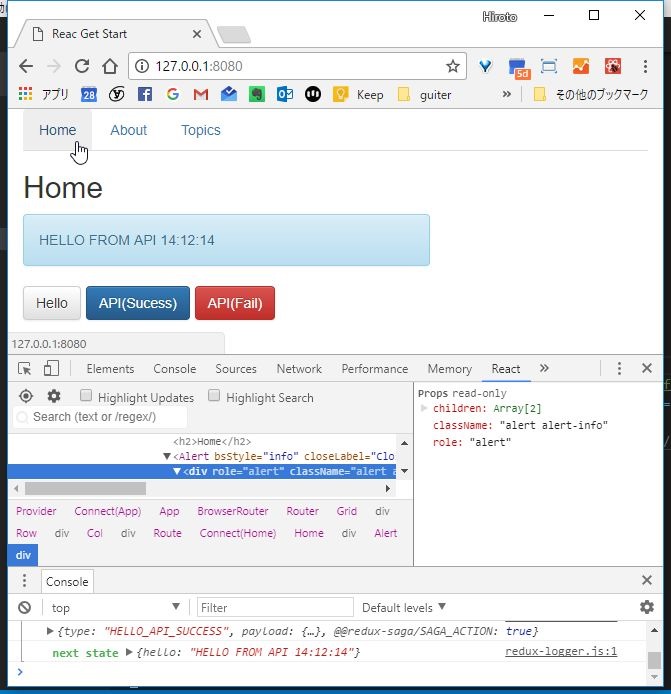
実行したところ。Bootstrap UI になったよ~
よし。次。