Python 数学、統計、機械学習:散布図と相関分析(1)


1.相関分析
相関分析とは、二種類のデータの関係の強さを相関係数で表現する分析手法
分析の手順は
- 散布図を描く
- 散布図をみて関連性を推測
相関係数とは、
- 2変数間の関連性の強さを図る
- 一般的に小文字のr (correlation) であらわす
- 常に -1 ~ 1 の間の値をとる
- 正の値の場合、正の相関、負の値の場合、負の相関がある
相関係数の強弱
| 相関係数 | 相関の強さ |
| ~ 0.3未満 | ほぼ無相関 |
| 0.3 ~ 0.5未満 | 非常に弱い相関 |
| 0.5 ~ 0.7未満 | 相関がある |
| 0.7 ~ 0.9未満 | 強い相関 |
| 0.9以上 | 非常に強い相関 |
2.散布図を描く
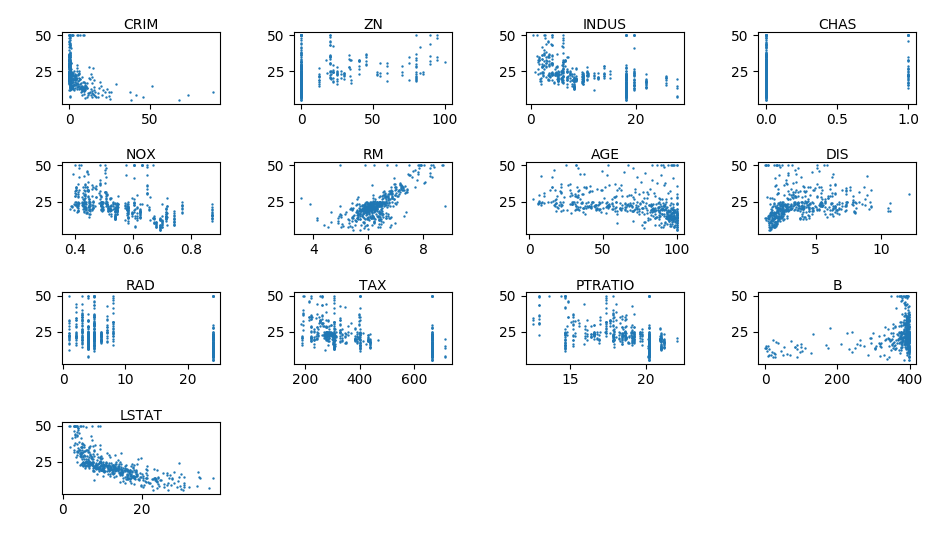
基本統計量、ヒストグラムで使用したボストンの住宅価格のデータセットの各説明変数(x) と 住宅価格の中央値(y) の散布図を描く。
以下のサイトから引用
https://pythondatascience.plavox.info/matplotlib/%E6%95%A3%E5%B8%83%E5%9B%B3
matplotlib.pyplot.scatter(x, y, s=20, c=None, marker='o', cmap=None, norm=None,
                          vmin=None, vmax=None, alpha=None, linewidths=None,
                          verts=None, edgecolors=None, hold=None, data=None,
                          **kwargs)
| パラメータ | 内容 |
| x.y | グラフに出力するデータ |
| s | サイズ (デフォルト値: 20) |
| c | 色、または、連続した色の値 |
| marker | マーカーの形 (デフォルト値: ‘o’= 円) |
| cmap | カラーマップ。c が float 型の場合のみ利用可能です。 |
| norm | c を float 型の配列を指定した場合のみ有効。正規化を行う場合の Normalize インスタンスを指定。 |
| vmin,vmax | 正規化時の最大、最小値。 指定しない場合、データの最大・最小値となります。norm にインスタンスを指定した場合、vmin, vmax の指定は無視されます。 |
| alpha | 透明度。0(透明)~1(不透明)の間の数値を指定。 |
| linewidths | 線の太さ。 |
| edgecolors | 線の色。 |
from sklearn import datasets
import pandas as pd
import matplotlib.pyplot as plt
import math

def correl_sccater(*feature_index):
    """
    https://pythondatascience.plavox.info/matplotlib/%E6%95%A3%E5%B8%83%E5%9B%B3
    :return:
    """
    boston = datasets.load_boston()

    df_ex = pd.DataFrame(boston.data)
    df_ex.columns = boston.feature_names
    import pprint
    print(pprint.pprint(df_ex))

    df_res = pd.DataFrame(boston.target)
    df_res.columns = ['Price']

    y = df_res['Price']
    fig = plt.figure()

    cnt = len(feature_index)
    cols = 1 if cnt == 1 else (2 if cnt < 6 else 4)
    rows = math.ceil(cnt / cols)
    idx = 1
    for feature in feature_index:

        x = df_ex[feature]
        ax = fig.add_subplot(rows, cols, idx)

        ax.set_title(feature, fontdict={'fontsize': 10}, pad=2)
        ax.scatter(x, y, s=0.5)
        idx = idx + 1

    plt.tight_layout()
    plt.show()


if __name__ == "__main__":
    correl_sccater('CRIM', 'ZN', 'INDUS', 'CHAS', 'NOX', 'RM', 'AGE', 'DIS', 'RAD', 'TAX', 'PTRATIO', 'B', 'LSTAT')
    #correl_sccater('RM')